Manage Policies at Scale
Full policy lifecycle management with visual builder, OPA integration, and real-time effectiveness tracking.
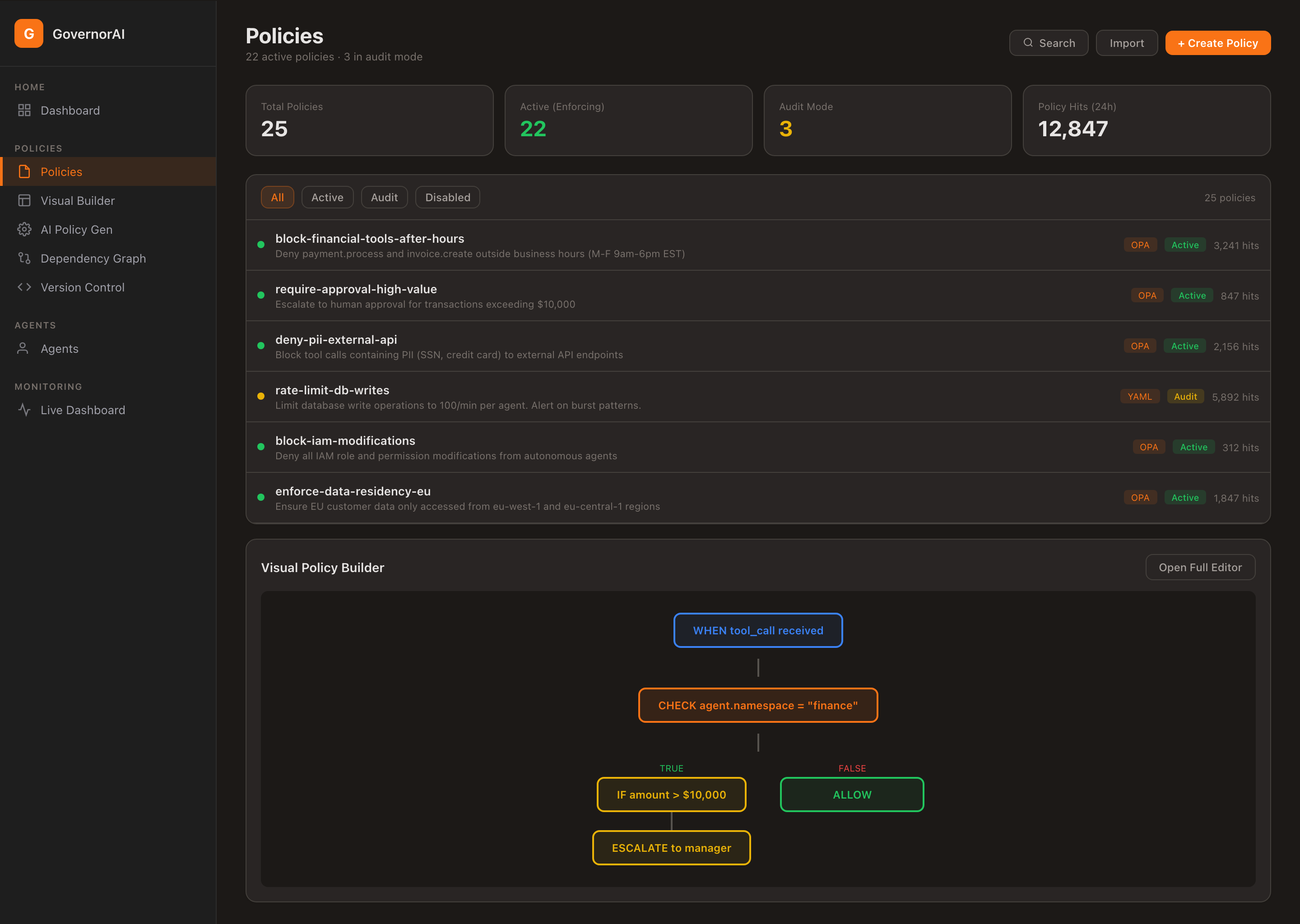
Policy Management — Active policies, audit mode, hit tracking, and visual policy builder
Declarative policy for autonomous AI. Version controlled, auditable, and reviewable—just like infrastructure code.
A complete GovernorAI™ policy in annotated YAML.
id: finance-agent-policy
name: "Finance Agent - Production"
agent_id: "finance-agent-v1"
governance_mode: enforcement
fail_closed: true

session:
  max_steps: 50

cost:
  max_usd_per_session: 25.00

tools:
  allowed:
    - "erp.*"
    - "email.send"
  denied:
    - "shell.*"

rules:
  - id: high_value_payment
    priority: 1
    match:
      tool: "erp.process_payment"
      condition:
        field: "args.amount"
        operator: ">"
        value: 5000
action: require_approvalgovernance_modeControls enforcement level: audit_only, shadow, or enforcement.
fail_closedWhen true, actions with no matching policy are denied. Default for production.
sessionSession-level limits: max steps, cost caps. Prevents runaway agent behavior.
toolsGlob-pattern allow/deny lists for tool access. erp.* allows all ERP tools.
rulesConditional rules with priority. Match on tool + argument conditions. Actions: allow, deny, require_approval.
For complex logic that goes beyond YAML, GovernorAI integrates natively with Open Policy Agent.
OPA runs embedded within GovernorAI. No external dependencies. Lowest latency.
Evaluate policies against an external OPA server. Share policies across services.
Load Rego bundles from S3, GCS, or HTTP. GitOps-friendly policy distribution.
YAML rules for simple patterns, Rego for complex logic. Best of both worlds.
package governor.finance

default allow = false

# Allow ERP tools under $5000
allow {
    startswith(input.tool, "erp.")
    input.args.amount <= 5000
}

# Require approval for high-value payments
require_approval {
    input.tool == "erp.process_payment"
    input.args.amount > 5000
}

# Always deny shell access
deny {
    startswith(input.tool, "shell.")
}

# Deny if session cost exceeded
deny {
    input.session.total_cost_usd > 25.00
}GovernorAI supports five matching modes for tool allow/deny lists, evaluated against the fully-qualified tool name.
erp.process_payment — ExactMatches only that exact tool name. No wildcards applied.
erp.* — Prefix wildcardMatches any tool starting with erp. — erp.read, erp.write, erp.process_payment.
*.delete — Suffix wildcardMatches any tool ending with .delete — db.delete, file.delete, user.delete.
*admin* — ContainsMatches any tool containing admin — user.admin.create, admin.dashboard.
* — GlobalMatches every tool. Common in audit_only mode for full observability before writing targeted rules.
tools:
  allowed:
    - "erp.*"          # All ERP namespace tools
    - "email.send"     # Exact match only
    - "*.read"         # All read operations

  denied:
    - "shell.*"        # No shell access
    - "*.delete"       # No delete operations
    - "*admin*"        # No admin-scoped tools

rules:
  - id: high_value_payment
    priority: 1
    match:
      tool: "erp.process_payment"  # Exact match
      condition:
        field: "args.amount"
        operator: ">"
        value: 5000
action: require_approvalEvery policy change is versioned. Roll back to any previous version instantly.
# List all versions of a policy
curl http://localhost:8081/api/v1/policies/finance-agent-policy

# Response includes version history
{
  "id": "finance-agent-policy",
  "current_version": 3,
  "versions": [
    {"version": 1, "created_at": "2025-01-10T..."},
    {"version": 2, "created_at": "2025-01-12T..."},
    {"version": 3, "created_at": "2025-01-15T..."}
  ]
}
# Rollback to a previous version
curl -X POST \
http://localhost:8081/api/v1/policies/finance-agent-policy/rollback \
-H "Content-Type: application/json" \
-H "Authorization: Bearer <token>" \
-d '{"target_version": 1}'
# Response
{
"id": "finance-agent-policy",
"version": 4,
"rolled_back_from": 3,
"rolled_back_to": 1,
"status": "active"
}Progressive enforcement. Start observing. Finish enforcing.
Log every action. Never block anything. Understand what your agents are doing before writing a single policy.
Best for: New deployments, discovery phase.
Evaluate policies against live traffic. Log what would be blocked, but allow everything through.
Best for: Policy validation, shadow testing.
Full policy enforcement. Every action evaluated. Allow, deny, or require approval. Fail-closed by default.
Best for: Production workloads, compliance.
Wrap your agent in three lines. GovernorAI evaluates every tool call before it reaches your systems.
from governor import governed

@governed(agent_id="finance-agent-v1")
def run_agent(input, __gov_ctx__=None):
    # Every tool call is intercepted automatically
    result = __gov_ctx__.execute(
        "erp.process_payment",
        {"amount": 4500, "currency": "USD"}
    )
    return result
import "github.com/sentinellayer/governor-sdk-go/governor"
c := governor.NewClient(
"http://localhost:8080",
governor.WithAPIKey("your-api-key"),
governor.WithTimeout(10*time.Second),
)
s := c.NewSession("finance-agent-v1", "production")
s.SetTraceID("trace-abc-123") // optional distributed trace
result, err := s.Execute("erp.process_payment", map[string]interface{}{
"amount": 4500, "currency": "USD",
})
switch {
case governor.IsDenied(err):
log.Fatal("action denied by policy:", err)
case governor.IsApprovalRequired(err):
approvalID, _ := governor.GetApprovalID(err)
// Route to human approval workflow
case governor.IsKilled(err):
log.Fatal("agent kill switch activated:", result.Reason)
}curl -X POST http://localhost:8080/api/v1/gateway/execute \
-H "Content-Type: application/json" \
-H "Authorization: Bearer <api-key>" \
-d '{
"agent_id": "finance-agent-v1",
"session_id": "sess-123",
"namespace": "production",
"tool": "erp.process_payment",
"args": {"amount": 4500, "currency": "USD"},
"trace_id": "trace-abc-123"
}'
# Response
{
"action_id": "act-789xyz",
"decision": "allow",
"reason": "Tool erp.process_payment is allowed by policy",
"rule_id": "tool_allow",
"latency_ms": 2,
"metadata": {
"agent_id": "finance-agent-v1",
"namespace": "production",
"tool": "erp.process_payment"
}
}GovernorAI intercepts Bedrock Action Group invocations via a Lambda proxy — before they reach your backend systems.
A Lambda function intercepts every Bedrock Action Group invocation and calls the GovernorAI gateway for policy evaluation before executing any business logic.
Each agent type maps to an isolated GovernorAI namespace. Finance agents use bedrock-finance policies; HR agents use bedrock-hr. Policies are fully separated.
If GovernorAI is unreachable, the proxy denies all actions. Your Bedrock agents cannot act without governance — even during infrastructure events.
# Namespace auto-detected from Bedrock action group
NAMESPACE_MAPPING = {
    'finance': 'bedrock-finance',
    'hr':      'bedrock-hr',
    'support': 'bedrock-support',
}

def lambda_handler(event, context):
    action_group = event.get('actionGroup')
    api_path     = event.get('apiPath', '/')
    session_id   = event.get('sessionId')
    agent_id     = event['agent']['id']

    # Map Bedrock action to GovernorAI tool name
    tool_name = f"{action_group}.{api_path.strip('/').replace('/', '.')}"
    namespace = NAMESPACE_MAPPING.get(action_group, 'bedrock-default')

    response = call_governor(
        tool=tool_name, args=args,
        agent_id=f"bedrock-{agent_id}",
        session_id=session_id, namespace=namespace
    )

    decision = response.get('decision', 'deny')
    if decision == 'allow':   return execute_business_logic(tool_name, args)
    if decision == 'deny':    return error_403(response.get('reason'))
if decision == 'pause': return pending_approval(response)Full policy lifecycle management with visual builder, OPA integration, and real-time effectiveness tracking.
Get early access to GovernorAI and define governance-as-code for your AI agents.